
Check Your Pesco Bill Online – Fast, Secure & Free

People of KPK living anywhere worldwide can check the Pesco bill online from this website. It will help the people of KPK have electricity connections in KPK, excluding merged districts formerly tribal areas, to check the Pesco online bill. For those in tribal areas, please visit our TESCO Bill page. Simply enter your 14-digit reference number or customer ID to view your bill details, including the due date and the amount payable before and after the due date.
Pesco customers can easily check their duplicate bills online for free using printebill.com. Simply enter your reference number or customer ID, and the bill is generated automatically. You can then download the bill as a PDF or print it directly.
How to Check Pesco Bill Online?
PESCO online duplicate bills can be checked with a few clicks. The steps are given below to check your bill, Pesco online.
- Visit printebill.com in your Chrome browser.
- Click on the Pesco Bill in the menu.
- Enter your reference no/customer ID and select customer ID if you want to check with customer ID, and hit search.
- A preview of your monthly Pesco online bill will be generated, where you can check your bill amount and due date.
- Click on the print button to download the Pesco online billing in PDF or take a printout.
Note: Select the printer in design to take the printout, and if you want to download, select download in PDF.
These are the steps to download the Pesco duplicate bill online from printebill.com. You can check and download, or print the Pesco billing online anywhere in the world. For a visual walkthrough, watch our video guide that demonstrates how to check and print your Pesco bill online, or check the detailed guide on how to check your electricity bill online.
What is a Reference Number?
A Reference Number is a connection identification number that helps Pesco identify where the connection is installed. Pesco can track all the records of a specific connection with a Reference Number from billing to units consumed. It is given to every connection at the time of installation. A customer can install many connections in his name and CNIC, but to find the specific connection, a unique reference number is given so the connection can be identified easily.
How to Find Your Reference Number:
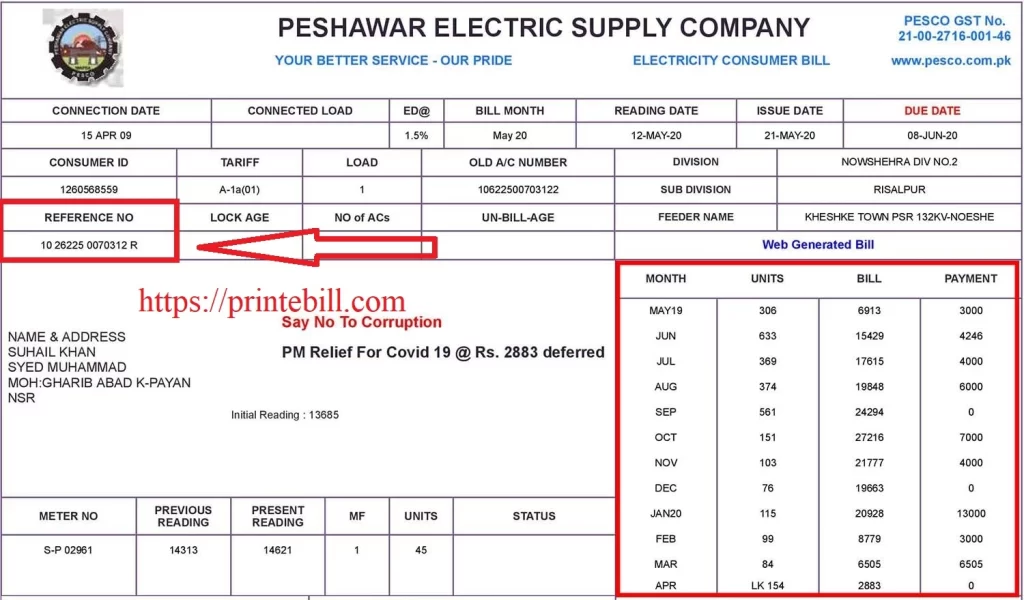
- Look at the top left section of your previous PESCO bill.
- The 14-digit reference number is printed under ‘Consumer Details.
A picture of the bill with the reference number circled in red is attached. If you also have a connection in Islamabad, you can check your bill on our IESCO Bill page.
How to Check the Pesco New Connection Bill Online
If you cannot locate your Reference Number, or if you have not received your first bill and want to check your bill online. Contact the Pesco helpline or visit your nearest customer service center to get your reference number. After that, you can check your Pesco electric bill online.
Introduction of PESCO:
PESCO stands for Peshawar Electric Supply Company and is responsible for power distribution and maintenance of KPK, except for the newly merged districts. Pesco was formed in 1998 by dividing Wapda as per the 1984 amendment of the Pakistan constitution. It provides power supply to approximately 3.8 million customers in the KPK province. To learn more about Pesco, visit the Pesco Official website.
PESCO Service Area:
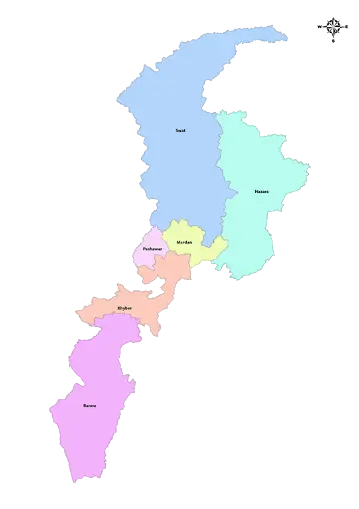
Pesco maintains a power distribution system with 132 KV and 66 KV grid stations and provides electricity to customers via 11 kV and 440 V lines in its jurisdiction. To work efficiently, Pesco has been divided into 8 circles, which cover 1204621 hectares of land, making it one of the biggest electric supply companies in Pakistan. Pesco Circle’s names are given below.
PESCO Circles PESCO Circles Bannu Circle Mardan Circle Hazara Circle-1 Peshawar Circle Hazara Circle-2 Khyber Circle Swabi Circle Swat Circle
What Pesco Offers:
These are the main responsibilities Pesco offers to its consumers for the smooth supply of electricity.
PESCO Online Billing:
Pesco introduced online billing to facilitate its customers in checking their bills online. The government of Pakistan has started the project under the Power Information Technology Company to reduce the use of paper billing. The Ministry of Energy ordered all the power distribution companies to start the services of online billing. Pesco welcomed the initiative and started e-billing, where customers can see their bills online with their reference number or customer ID.
Understanding the PESCO Duplicate Bill
Understand your PESCO duplicate bill to see what information is provided on the bill. Here is the detailed bill information to better understand your PESCO electricity bill.
Customer Information:
- Name: The owner’s name on which the connection is installed.
- Address: The address where the connection is installed.
- Category: The category under which the connection is installed (Residential or Commercial).
- Reference Number: The unique number to identify the connection used for billing and complaints.
- Customer ID: The alternative number for a reference number to identify the connection.
Connection and Meter Info:
- Connection Load: The sanctioned load for the connection in kWh.
- Meter Number: The unique number given to the connection meter.
- Meter Reading Date: The date on which the reading was recorded for billing.
- Previous Reading: The reading that was recorded at the start of the billing cycle.
- Current Reading: The reading that was recorded at the end of the billing cycle.
- Unit Consumed: The difference between the current and previous readings is the number of units consumed.
Billing and Payment Information:
- Billing Month: The Month for which the bill is generated.
- Issue Date: The date when the bill is issued.
- Due Date: The specific date after which a fee will be charged.
- Total Amount: The total bill amount, including taxes and charges.
- Arrears: The remaining amount of the bill is to be paid from the previous bill (If any).
- Payable Amount Within Due Date: Total amount to be paid within the due date, including arrears.
- Payable Amount After Due Date: Total amount to be paid after the expiry of the due date, including late payment surcharge.
PESCO Bill Charges and Taxes Breakdown
The detailed breakdown of charges and taxes imposed on the PESCO electricity bill is to be paid by the consumers.
Note: These charges and taxes can vary. Please visit NEPRA for confirmation of charges and taxes.
- TV Fee: A fee of 35 rupees is charged for residential and 60 rupees for commercial connections to support the state-run television channel.
- GST: A General Sales Tax (GST) is charged to the customer on the usage of electricity. Currently, 17% is charged on the total bill amount.
- FPA: Fuel Price Adjustment is the cost of fuel for the production of electricity. FPA is calculated on the month before units are consumed. The FPA is provided by NEPRA every month.
- FC Surcharge: The Financing Cost surcharge has been collected for the repayment of loans & debt on the electricity generation projects. Currently, an FC surcharge of 0.43 paisa/unit is charged in the bill.
- Electricity Duty: Electricity duty is a provincial government tax collected on the bill. The duty is currently 1 to 1.5% of the bill amount, depending on the usage of electricity and the category of connection.
Estimate Your PESCO Bill:
PESCO consumers can now estimate their bills through our PESCO Bill Calculator. Here is the step-by-step guide on how you can estimate your monthly bill.
- Visit printebill.com in your browser.
- Locate the Pesco bill calculator in the footer & click on it.
- Check the category for which you are estimating your bill (Commercial or Residential).
- Enter the number of units consumed in the month.
- If you are estimating the bill for a residential connection, check the box if your last 6 months of consumption have not exceeded 200.
- Click on the calculate button to view your estimated bill.
Note: The estimated bill is an estimation, not the original bill. The original bill can vary from your estimated bill. If you find any discrepancy in your original bill, contact the Pesco helpline at 118.
How to Apply For a PESCO New Connection
The process to get the Pesco new connection is straightforward. Here is the step-by-step process for the installation of a new connection.
- Visit the ENC to apply for the new connection.
- Click on apply.
- A form will open; fill out the form details.
- Attach the required documents like the CNIC of the applicant, the CNIC of the witness, Proof of ownership, and the neighbor’s electricity bill copy.
- Submit the form and take a printout of the form.
- Attach the documents mentioned above and submit them to the nearest Pesco office.
- A technical team will visit the site and verify the details.
- If the connection is approved, a demand draft will be generated, which you have to pay before installation.
- After that, the connection will be installed.
The new connection installation process can take up to 45 days, depending on the requirements and infrastructure needed. To learn about the detailed process, visit our How to Get a New Connection in Pakistan.
Pesco Light App:
For the facilitation of consumers, Pesco introduces the Pesco Light App with the help of Power Information Technology Company (PITC). It enhances the user experience of the Peshawar Electric Supply Company (PESCO).
Features of PESCO Light APP:
The main features of the app are
- PESCO Duplicate Bill: PESCO consumers can check their bills with ease through the app. With the Reference number, you can check your duplicate bill directly on the app.
- Load Shedding Schedule: Users of Pesco can check real-time load-shedding schedules, which are regularly updated on the app and help users to manage and plan their work accordingly.
- Lodge Complaint: Users of PESCO can lodge and track their complaints through the app.
- New Connection Application: You can also apply for a new connection through the app, streamlining the process for the customer’s ease.
- SMS Billing Service: Register your number for the Pesco SMS billing service through the app so you never miss the bill payment notification.
Download the Pesco Light app from Google Play and enjoy the streamlined processes of Pesco Services.

How to Pay your PESCO Wapda Bill Online:
Electricity users can now pay their bills online using their unique reference number. The Power Information Technology Company, with the help of banks, prepared a mechanism so that all DISCO electricity users can pay their bills online. Pesco users can also pay their bills online using their bank’s official apps or website by entering their reference number.
Step-by-Step Guide on How to Pay the Pesco Electricity Bill Online with EasyPaisa or JazzCash
- Log in to the EasyPaisa or JazzCash app on your mobile.
- Navigate to bill payment and select electricity.
- Select Pesco as the service provider.
- Enter your reference number to check your bill amount.
- Click on the pay button to pay your bill online.
How to Register Your Complaint Online
Here is the step-by-step guide on how to register a complaint online.
- Visit the CCMS.
- Click on the registered complaint in the menu.
- Enter the reference number and search. Your connection details will appear.
- Fill out the form with the nature and details of the complaint.
- Upload images of the evidence.
- Submit the form to register your complaint.
You will receive acknowledgment of the complaint registered within 24 hours, and the complaint will be resolved within 15 days, depending on the nature of the complaint.
How to Track Complaints Online:
You can also track your registered complaints and check their status online. Here is the step-by-step guide on how to track your complaint status.
- Visit the CCMS website.
- Click on “track your complaint” in the menu.
- Enter your reference number.
- Click on the submit button to see the status of your complaint.
Pesco Helpline:
For Pesco customers, below are the contact numbers and addresses of the Pesco helpline where they can register their complaints and receive follow-ups. Users of Pesco Electricity can complain about bill correction, overbilling, and power outages, and obtain any information regarding Pesco services.
Pesco Customer Care Channels Pesco Customer Care Contact & Address Helpline 118 SMS Helpline 8118 Phone # 111-000-128 Address WAPDA House, Mall Road, Bashirabad, Peshawar
FAQ:
How do I check my Pesco bill online?
Visit the website https://printebill.com/ and find the Pesco online bill. Click on the button, which will take you to a new page where you have to enter your reference number to check your Pesco bill and hit the print button to download or take the printout.
How do I pay my Pesco bill online?
Log in to any bank’s official app and locate the utility bill option. After clicking it, find electricity, enter your reference no, and select the Peshawar Electric Supply Company (Pesco), and it will show the amount of the bill. Hit the pay button, and your bill will be paid. You will receive a confirmation SMS from your bank, and the amount will be deducted from your account.
How do I check if my Pesco bill is paid or not?
You can confirm if your electricity bill is paid or not by calling the PESCO helpline 118 or by visiting your nearest Pesco office. Also, if you pay the bill online, you can see if the bill is paid or not in your transaction history.
How can I check my electricity bill via SMS?
To check your Pesco electricity bill through SMS, type the PITC <Space> reference number and send it to 8118. You will receive your current month’s bill through SMS. The charges may be applied to check your bill through SMS.
How do I check a Pesco bill without a reference number?
You can check your Pesco electricity bill through your Customer ID. Visit printebill.com and locate the Pesco bill in the menu. Select Customer ID instead of Reference Number. Enter your 10-digit customer ID and click on the search button to check your bill. You can also call 118 and get your bill via SMS and Email.
How do I find the Pesco bill with the name?
Currently, there is no way to find your Pesco electricity bill with your name. You can only check your bill online using the reference number and customer ID.
What is the detection bill in Pesco?
The detection bill is charged to consumers if the consumer meter is found to be faulty or the consumer is caught in electricity theft. It is charged to the customer on the last 6 months consumed units pattern.
Conclusion:
This article showed you how to check your PESCO bill online, find your reference number, and pay your bill easily. We also shared PESCO’s complaint helpline and office address so you can contact them if you have any issues.
You can contact us if you are still facing issues in checking your Pesco electricity bill. We will try to solve it ASAP. Contact us via our email, and we will reply to you as soon as possible.
