
AJK Bill Online Check & Download Your Duplicate AJKED Electricity Bill

Residents of Azad Jammu and Kashmir can check their electricity bills online for free with our AJK Bill tool. To check your AJKED bill online, you need only the reference number. The tool is brilliant and quick, generating AJK electricity bills easily with just one click. Check your AJK electricity duplicate bill from anywhere in the world for free. You can also check and pay it online via authorized payment channels, e.g., EasyPaisa, JazzCash, and any bank app using the reference number. Hazara Division electrcity consumer can check their on Hazeco bill.
Technology has improved our lives a lot. The work we do in hours now can be done in seconds. The government of Pakistan introduced an online system so the people of Pakistan & AJK can check their electricity bills online. So, their connections are not disconnected due to non-payment of bills. Now you can check your bill timely, thanks to our online bill checks of printebill, and save your connection from disconnecting. You can also check and pay your bill online using authorized channels.
How to Check the AJK Bill Online?
To check your AJK web bill, you should have a reference number or customer ID. The steps are given below to check your AJK duplicate bill using your reference number.
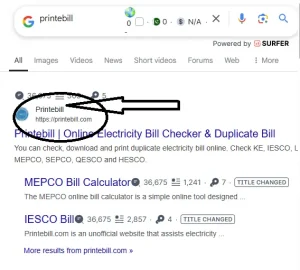
- Write printebill.com in your browser and click on search.
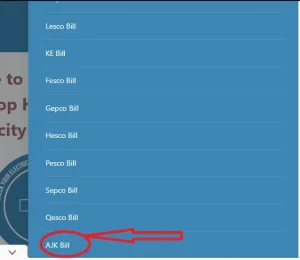
- Open the first result of the search, and on the homepage, look for the AJK bill
- Click the Check your bill now button in the AJK section.
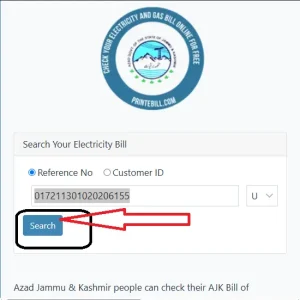
- On the newly opened page, enter your reference number or customer ID. (Note: for rural areas, check R, and for urban areas, check U)
- Click the search button to view your AJK electricity bill
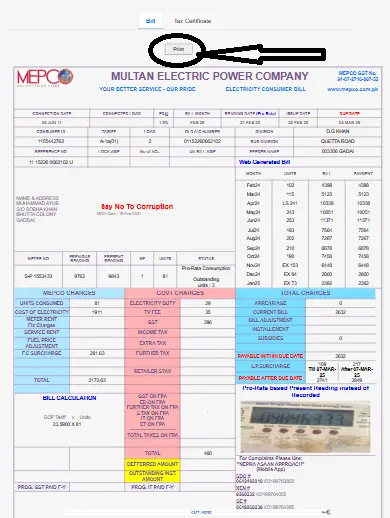
- To take the print or to download it, hit the print button to save the AJK electricity bill download PDF for a printout.
The images below show how you can check your AJK Online Bill from printebill.com.

How to check your AJK electricity bill online is guided in the video below.
Common Issues in AJK Electricity/Barkiat Bill Online Check:
You may encounter issues while checking your AJK electricity bill online. The most common reasons include incorrect reference numbers, temporary website downtime, or internet connectivity problems. To resolve these issues:
- Double-check that you have entered the correct reference number.
- Try accessing the website at a different time if it is temporarily down.
- Clear your browser cache or use a different web browser.
- If the issue persists, visit the nearest AJK Electricity Department office or contact their customer support for assistance. Also, you can contact PITC and register your complaint by calling 118.
What is the AJKED Bill Reference No./Customer ID, and how do I find it?
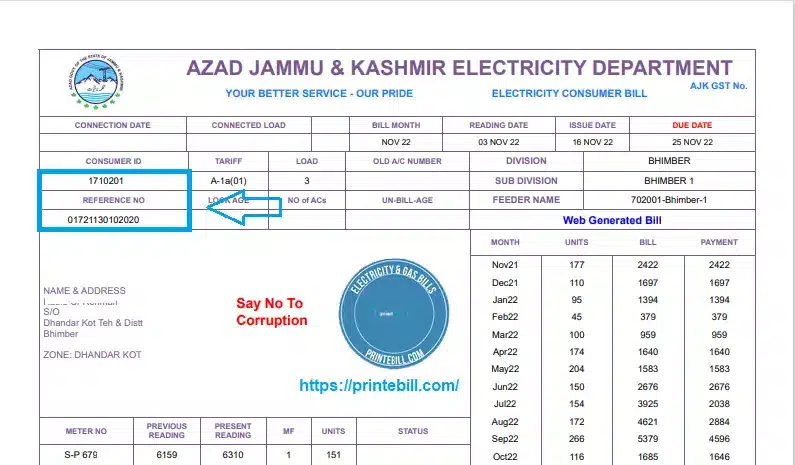
When a customer applies for an electricity connection, the electricity department issues a unique number called the reference number for the connection. The reference number contains the history of that connection. How can I get the AJK electricity bill reference number? Your reference number is also printed on your monthly electricity bill to check your connection history and bill payment. The reference number is like the ID card on your electricity bill. If you misplaced it or did not remember, you cannot check your bill online.
You can check your printed reference number or customer ID on your bill just above the name of the connection owner. You can see the picture below to know where it is printed. Enter this reference number to check your monthly electricity bill from printebill.com for free. Lahore Division consumers can check their Lesco Bill online.
If You Can’t Find Your AJK Electricity Bill Reference Number Online:
If you don’t have an old bill, contact the AJK Electricity Department (AJKED) through their helpline or visit their nearest office. You can also call PITC after taking the necessary information; they can give you the reference number of your bill.
About AJKED:
The Azad Jammu & Kashmir Electricity Department is responsible for the distribution, construction, operation, and maintenance of electricity in AJK. Almost 93% of AJK has the availability of electricity, and it has a maximum requirement of 400 MW, according to the P&D Department of AJK. The government of Pakistan is working for a separate DISCO (distribution company) for AJK, like other parts of Pakistan.
AJKED Technical Overview:
AJKED buys its electricity from three power distribution companies, PESCO, IESCO, and GEPCO, and almost 70% of its electricity comes from PESCO. These DISCOs look after the planning, construction, operations, and maintenance of the 132 KV & 33 KV grids. You may also want to check your Pesco bill online. AJK is producing around 2300 MW of electricity with hydro projects like the Neelum-Jhelum Hydro Project (969 MW) and the Mangla Dam (100 MW). AJKED has 0.6 million customers and has 02 circles and 15 operational divisions to provide smooth electricity to the people of AJK.
AJK Electricity Bill:
AJKED charges its customers monthly based on units consumed, along with distribution and maintenance costs. On the due date, you have to pay your Azad Kashmir electricity bill, and if you do not pay your bill on the due date, you are charged for late payment. To avoid a late payment surcharge, check your bill online and pay it through any channel.
How to Pay AJK Electricity Bill Online:
Now, customers of the AJK electricity department can pay their AJKED bill online using any bank app. Enter your AJK bill reference number and pay your bill online through any bank app, and the bill payment amount will be deducted from your bank account. You can also pay your AJK electric bill via the EasyPaisa and JazzCash apps without the need to have an account in the bank. Karachi People can also check their bill on K-Electric Bill Online.
Additional Fees for Online Bill Payments:
Online bill payment through banking apps, EasyPaisa, or JazzCash may include a small service fee, depending on the payment provider; e.g., EasyPaisa charges 5 rupees per bill payment. Some banks offer free bill payments, so contact your bank or mobile wallet provider for applicable charges.
AJKED Helpline and Contact:
The government of Pakistan has initiated a common helpline to resolve issues of electricity consumers across the country, except for K-Electric, which has created its own customer care. Now, AJK people can also use the same helpline to resolve any electricity problem, whether it’s load-shedding or billing. You can lodge your complaint by calling or through SMS. You can also contact the Ajked number to register a complaint for numbers. For online complaints, visit the AJKED website.
Customer Care Contact Contact Number PITC Helpline 118 or SMS 8118 PITC Email ccms@pitc.com.pk AJKED Website https://ajked.gok.pk/ Address 9F5F+9RF, Muzaffarabad, Azad Jammu, and Kashmir
FAQ:
How can I check my Azad Kashmir electricity bill online?
Visit printebill.com to check your AJK electricity department bill online. Enter your reference number to check the bill amount and the due date of the AJK bill.
How can I print my electricity bill online?
Visit the website Printebill and enter your reference number to view the electricity bill. Click the print button to print the electricity bill.
How do I make a bill PDF?
Download your electricity bill in PDF. Just click the print button after entering your reference number and select Save as PDF to download the AJK bill in PDF.
