
IESCO Bill Online Check, Download IESCO Online Bill

Islamabad Electric Supply Company consumers can easily check their bills by entering their unique 14-digit Reference Number. Check your IESCO Bill Online by entering your Reference No/ Customer ID, download your IESCO duplicate bill, and take the printout for your record. Download the Islamabad electricity bill for your shop, office, and home. People of the Hazara region can check the Hazeco Bill here.
Check your Reference No. from the old IESCO electricity bill. If you do not have the reference number, call the IESCO helpline or visit the nearest IESCO Customer Support Center (CSC) with your ID Card. IESCO users from Islamabad to Attock and Jehlum can check their electricity bill (Bijli Bill) online by following simple steps. We developed this tool for you so you don’t have to worry about the delivery of the electricity bill and can check your bill online by entering your reference Number. This website is a third-party platform that facilitates the easy retrieval of your IESCO online bill.
How to Check IESCO Bill Online in Islamabad?
Residents of the IESCO coverage area, IESCO bill online check 14 digit reference number, following these steps;
- Enter your unique 14-digit Reference No/Customer ID
- Click the search button, and your duplicate bill will pop up in a new window
- Click the print button to download or take the printout
Following these simple steps, you can download your Islamabad electricity bill online. Watch the video to learn how you can check your IESCO electricity bill online.
Common Issues with the IESCO Bill Online check by reference number
If your bill does not show, it may be due to these issues
- Your bill may not be generated for the current month
- Check your reference number again. If a number is missing or entered incorrectly, your bill will not show
- Clear your browser Cache
- Check your bill in Chrome or Firefox
- Disable any Pop-up blocker if using
If your bill is still not showing, call the IESCO Regional Number 051-9252937 or 118 for help.
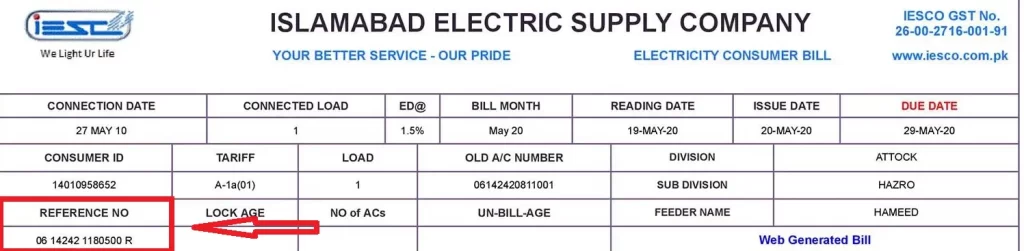
Where can I find the Reference No/Customer ID on the IESCO Electric Billing?
You can check your Reference number or customer ID on any old bill. The reference number is given on your bill just above your name and address. The picture is attached so you can easily find the Reference number and customer ID on your IESCO Islamabad electricity bill.
What is IESCO?
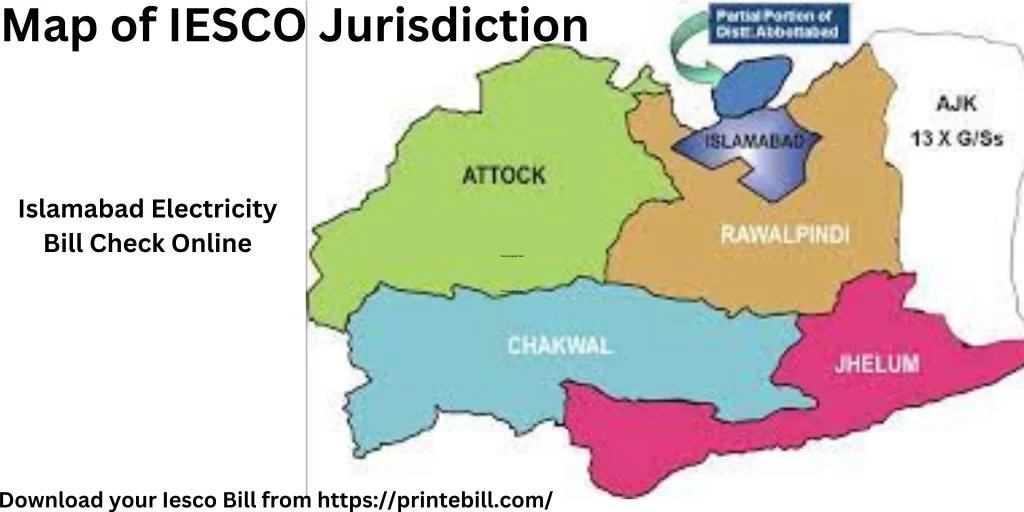
IESCO is the Islamabad Electric Supply Company, responsible for the distribution and maintenance of 6 districts. It was formed in 1998. The main purpose of IESCO’s creation was to increase customer satisfaction, increase revenue, reduce line losses, and wipe out corruption. IESCO is responsible for supplying and selling electricity from Attock to Jehlum. Check out the official website of IESCO for more info. It provides services in the following districts.
Iesco Service Districts Iesco Service Districts Islamabad Rawalpindi Attock Chakwal Jehlum AJK
IESCO Jurisdiction:
19 divisions of Islamabad Electric Supply Company are responsible for the supply and maintenance of electricity in the IESCO jurisdiction. Iesco is comprised of 4 circles, 19 divisions, and 104 subdivisions. The Circle in charge is the Superintending Engineers (SEs), while the Executive Engineers (XENs) head the divisions, and the Sub-Divisional Officer (SDO) heads the sub-divisions. Each Division has a dedicated Customer Service Officer called CSC. Below are some important circles and divisions of IESCO.
Islamabad Divisions Rawalpindi Divisions Other Divisions Islamabad Division 1 Rawalpindi Circle Taxila Division Islamabad Division 2 Rawat Division Gujar Khan Division Barakahu Division Satellite Town Division Chakwal Division Attock Circle Jhelum Circle AJK Circle
IESCO Electricity Billing Cycles:
The billing of IESCO consumers is done based on their batch numbers. The Batch numbers normally start from 1, and the reference number’s first two digits show your billing batch numbers. The first batch of billing starts on the 1st of every month and differs from every batch, and normally, after two days, the next batch of billing starts. The due date of each batch is different due to meter readings and billing.
A bill paid after the due date will incur a surcharge of 5% or 10% of the bill amount. The bill paid within 3 days after the due date will be surcharged 5% of the bill amount, and after 3 days, the late payment surcharge will be 10% of the amount of total bill amount. Before that, the late payment surcharge was a straight 10% of the bill amount. For more info, check the late payment surcharge.
How Do I Correct My Bill If I Find Errors and Surcharges?
If you have found any error in your IESCO bill, visit your nearest IESCO sub-division office. The documents required for the IESCO bill correction are
- Your IESCO bill copy
- ID card copy
- An image of your meter reading.
The SDO (Sub Divisional Officer) will verify the details and rectify your bill, or you can formally complain to IESCO customer service by calling 051-9252937 or 118.
IESCO Duplicate Bill Online Rawalpindi Detail:
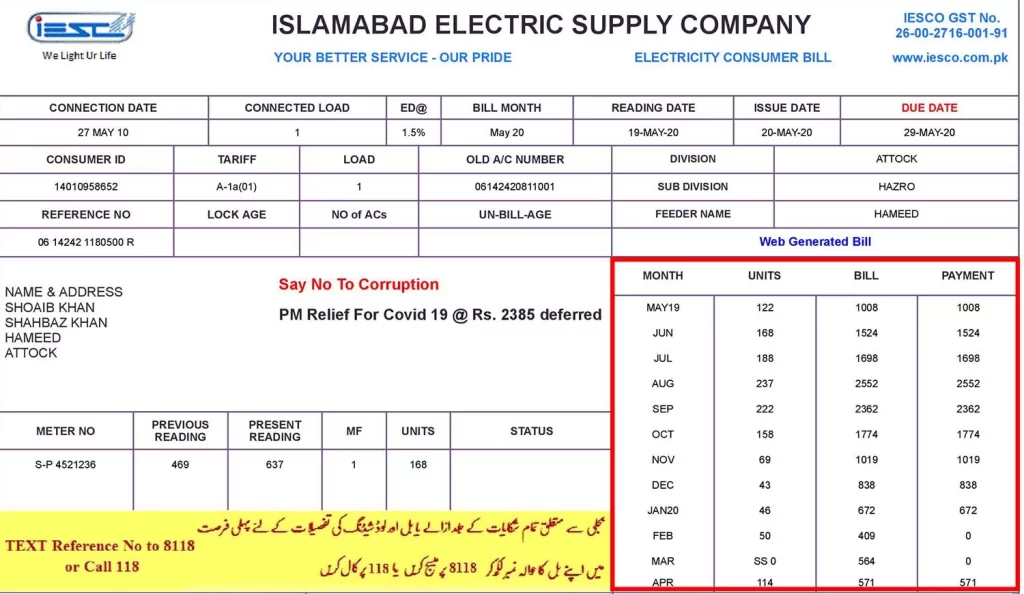
IESCO consumers can find all the details of their bills online. You can check the ownership details, date of connection, date of meter reading, previous and current month meter reading, unit consumed, due date, and, of course, the amount to pay before and after the due date. Users of IESCO can check their meter number and the amount of taxes charged on the bill. If you want to know the details of taxes, visit our detailed guide on taxes on electricity bills. You can check all the details of the previous monthly bills’ history of the Wapda electricity bill online. If you are from Peshawar and want to check the bill, visit the article to check the Pesco bill.
How to Pay IESCO Electricity Bills?
There are two ways to pay your IESCO Electricity bills. One is traditional, and the other is digital; you can pay with both. The traditional way is to take a printout of your bill and go to any bank branch or post office, wait for hours in line, pay the bill, or go to any nearby Easypaisa, JazzCash, or Nadra-designated shops to pay your electricity bill. The modern way is to check Wapda online bills and pay them online using a credit card, via any bank app, or with money transactional apps like Easypaisa, Upaisa, and JazzCash. To pay your electric bill, you will only need your Reference No/Customer ID.
How to Pay IESCO Bill Online via Easypaisa & JazzCash:
Here is the step-by-step guide on how to pay your bill online with JazzCash and EasyPaisa.
- Log in to the EasyPaisa or JazzCash app
- Click on the bill payment option
- Select the IESCO company for bill payment
- Enter the reference number to check the bill amount
- Click the pay bill button to pay the bill service fee, which may be charged for paying the bill via JazzCash and Easypaisa
Watch the detailed video on how to pay your IESCO online bill via EasyPaisa and JazzCash. Paying the bill with these channels is secure.
Pay your Iesco Bill Online Using Banks’ APPs or ATMs:
You can also pay your IESCO electricity bill via any bank’s official app. Here is the step-by-step guide to pay your bill online
- Log in to your bank’s official app
- locate the utility bill payment option
- Select the IESCO company bill payment
- Enter your reference number and click the Pay button
- The Bill amount will be deducted from your account
Here is a Detailed video on how you can pay your bill via bank apps
You can also pay bills via ATMs by selecting the utility bill, selecting the Iesco company, and clicking the pay button to pay your Iesco online bill.
Receive Your IESCO Duplicate Bill via Email and SMS:
Register your email address on the official IESCO website and receive your bill via email before the due date. IESCO consumers can also benefit from the great feature of SMS billing, which allows them to receive bills via SMS. To activate these features, you must visit the official website of IESCO. You need to enter your reference number and mobile number to activate SMS, and for email, you will need to enter your email address to receive bills via email.
IESCO Wapda Electricity Bill Check Online: Checking Tax Details:
The taxes of all power supply companies are the same; you will find FPA(Fuel Price Adjustment), FC (Financing Cost) Surcharge, Quarterly Tariff Adjustment (QTRA), and Deferred Amount. If you want to learn more about taxes, read our article Taxes in Electricity Bill.
How to get the Installments of the Bill:
As per Iesco, installment of the current bill is not allowed; however, if you have arrears in the bill, you can pay that in installments. To get your bill installment, visit your nearest sub-division office to get the installment of your arrears. To know more about installments, visit the official IESCO website.
How to get IESCO New Connection:
If you move to the Iesco service area, and want to know the process for a new connection. The requirements for a new connection are
- Neighbor Electricity Bill
- ID card copy of the Applicant
- Proof of house ownership
- CNIC Copy of the witness
If you want to know more, check my detailed article on how to get a new electricity connection.
Calculate your IESCO Online Bill
You can calculate your estimated monthly IESCO online bill using our IESCO bill calculator. Enter your monthly consumed units to get an estimate of your electricity bill. The estimated bill may differ from your original bill, but it gives you an estimate. It calculates the bill with units consumed by multiplying the unit rate given by the NEPRA. It may differ due to the FPA charged on the 2 months before units are consumed.
Latest IESCO Tariffs:
The Islamabad Electric Supply Company has announced its latest tariffs for its consumers. These rates will determine the electricity bill of the consumers. After the NEPRA approved the tariffs, the new tariff became active. To learn about the Iesco tariff, visit the official Iesco website.
IESCO Peak Hours:
Iesco peak hours mean when the electricity demand is high, and off-peak hours are when the electricity demand is low. The Peak hours of IESCO are given below. Save electricity and minimize the use of electricity by turning off unnecessary lights, which will help you lower your bill because, in peak hours, the cost of electricity is high. To save the exhaustion of the system, IESCO introduced Peak hours when the rate of electricity is high, so the consumers save electricity and use electricity in off-peak hours when the demand is low and the rates are also low. Here are the season-wise peak hours of IESCO
Months Peak Hours Timings Off-Peak Timings December to February 5 PM to 9 PM Remaining hours March to May 6 PM to 10 PM Remaining hours June to August 7 PM to 11 PM Remaining hours September to November 6 PM to 10 PM Remaining hours
Tips to Reduce your IESCO Electricity Bill:
Here are some of the tips to reduce your electricity consumption and lower your electricity bill
Do not use heavy appliances during the peak hours when the unit rate is high. For example, do not use an iron, washing machine, or motor pump during peak hours.
- Use inverter AC & fans, which consume up to 30% less electricity
- Replace Old lights with LED lights, which consume up to 75% less electricity.
- Invest in energy-efficient appliances that also consume less electricity
- If you have a budget, install solar panels, which will reduce your electricity bill significantly
- Turn off unnecessary lights and appliances to reduce electricity consumption
These are some of the tips that will help you reduce your electricity bill drastically.
IESCO Customer Service and Complaint Office Details:
IESCO consumers can register their complaints online with the great initiative of the power ministry. You can also apply for the new connection online on the official website of the Electricity New Connection (ENC) System. Here are the contact and helpline numbers for any complaints or suggestions to improve the services of IESCO.
IESCO Customer Service Channels Numbers & Contact No. Phone 051-9252937,9252938,9252939 Fax 051-9252927 Helpline No 118 Email iesco@iesco.com.pk Address Islamabad Electric Supply Company, IESCO Head Office St,40 Sector G-7/4 Islamabad
FAQ:
How do I check my IESCO bill?
You can check your IESCO bill online by visiting our website, https://printebill.com/. Enter your reference number and click the search button. The preview of the bill will open. Click the print button to download the bill in PDF. If the bill does not show, check the reference number again or call 118 for further assistance.
How can IESCO bill online check by CNIC?
No, you can not check your IESCO electric bill by using your CNIC now, but maybe in the future, you can check it. You can check your bill using your reference number or customer ID. If you do not know the reference number, and the customer calls the IESCO Customer Care Number 051-9252937
Can we pay the IESCO bill online?
Yes, you can pay your IESCO utility bill using any bank app, EasyPaisa, or JazzCash. Under the section of utility bills, find IESCO and pay the bill using your reference number.
Can I extend the Due Date of my Bill?
Yes, by visiting the nearest IESCO office with the bill copy, you can extend your bill’s due date for 3 days.
How can I get a net metering facility?
Apply for a net metering facility online, and within three days, the net metering team will review it. For a detailed process, visit the IESCO official document.
How can I correct my Iesco electric bill?
You have to visit the nearest Iesco customer service center to correct the Iesco electricity bill. You need a copy of the bill with a meter reading image to prove your case that there is an error in your bill.
What is iesco meter name change fee?
It depends on the type of connection, but for a name change of a residential connection is between 500 to 1500 PKR.
Conclusion:
After reaching the end, I hope you have already checked your IESCO bill online and have taken the printout, or maybe even paid it online. All Pakistani electricity users can check and pay their bills online by visiting our website. After reading the guide, you have learned how to check and pay the IESCO bill online. You have also learned how to apply for the new IESCO connection, and you can also calculate your monthly IESCO electricity bill. We have also guided you on how you can make IESCO bill corrections if you find any errors in your bill.
