
Change of Name on Electricity Bill in Pakistan
In Pakistan, changing the name on an electricity bill can be a difficult task for someone who does not know the process of changing the name on an electricity bill. Why is a change of name on electricity bill in Pakistan necessary when you are selling or buying a property, or you are a taxpayer, so you want to change the electricity connection to your name to get benefits from the government of Pakistan, or any other issue?
There are two ways to change the name on the electricity bill. One is to visit the office like in the old days, and the other is to take advantage of the technology and apply online. We will discuss how you can change the name on the WAPDA bill.
Change of Name on Electricity Bill by Visiting the Concerned DISCO Office
Steps to Transfer Electricity Bill Ownership:
- Visit the Nearest WAPDA Disco Office
- Locate the office of your service provider (e.g., Lesco, Mepco, Tesco).
- Obtain and Fill the Application Form
- Provide the following details:
- Name on the current bill.
- Reference number.
- New applicant’s name (for ownership transfer).
- Contact number.
- Address.
- Provide the following details:
- Submit Required Documents
- Attach:
- CNIC copies of both the current and the new owner.
- Latest electricity bill.
- Proof of ownership (e.g., property deed, transfer affidavit).
- Attach:
- Pay Processing Fee
- A fee may apply (varies by service provider).
- Application Processing
- The company will review your submission.
- Processing time depends on
- Their current workload.
- The complexity of documentation/legal checks.
- Confirmation & Updated Bill
- You’ll receive a confirmation via your provided contact number.
- The revised bill with the new owner’s name will be issued.
Important Notes:
- Ensure documents are complete and accurate to avoid delays.
- Follow up with the office if the process takes longer than expected.
Change of Name on Electricity Bill Online:
The second process for the change of name on the electric bill is smooth. Here, you do not have to visit anywhere, but you can apply for a change of name on the Lesco bill or any other company online using the Electricity New Connection (ENC) System.
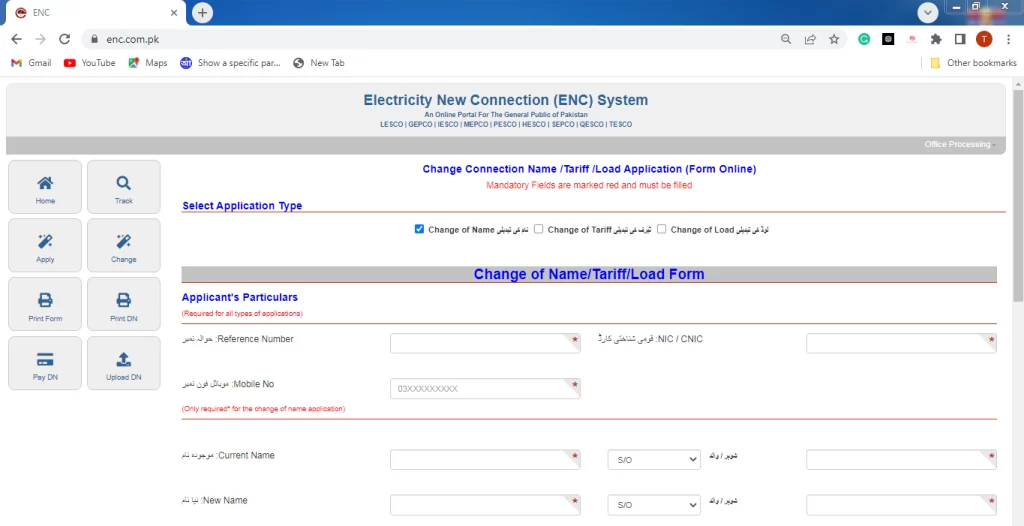
Steps to Apply for the Change of Name on the Electricity Bill Online:
- Visit the website enc.com.pk
- Click on the option to change. After the click, a form will open where you can select the option of a change of name, a change of territory, or a change of load.
- Put the reference number, CNIC, and mobile number.
- In the below, enter the current name with the father/husband’s name & the new name with the father/husband’s name, as you can see in the picture given above.
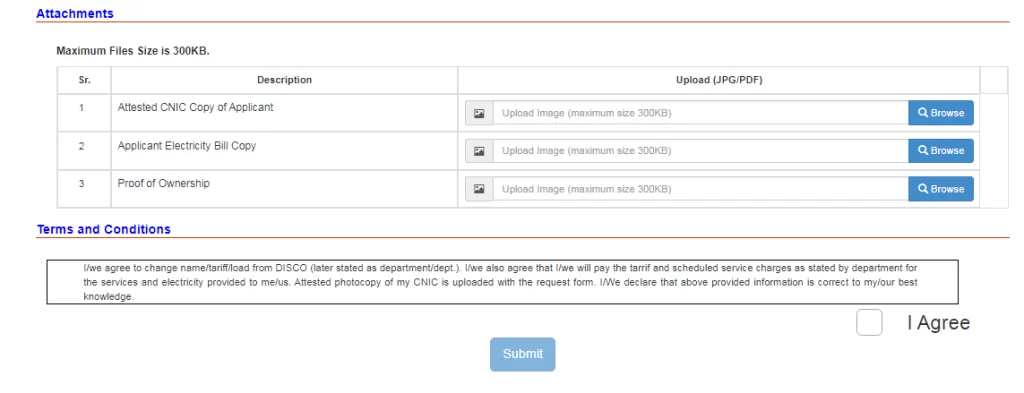
- Attach an attested copy of the applicant’s CNIC, the electrical bill of the respective company, and proof of ownership of land.
- In the end, check the agree button and submit your application. After that, the respected company will process your application and change the name on the electricity bill.
FAQs:
Conclusion:
The introduction of an online portal for the change of name on electricity bills in Pakistan made it a hassle-free task. You can use both ways to change the name of your respected company. KE consumers cannot change the name on the bill with this method. To change the name, visit the official website of KE. With a CNIC, an electric bill, and proof of ownership, you can change the name on any company bill except KE.